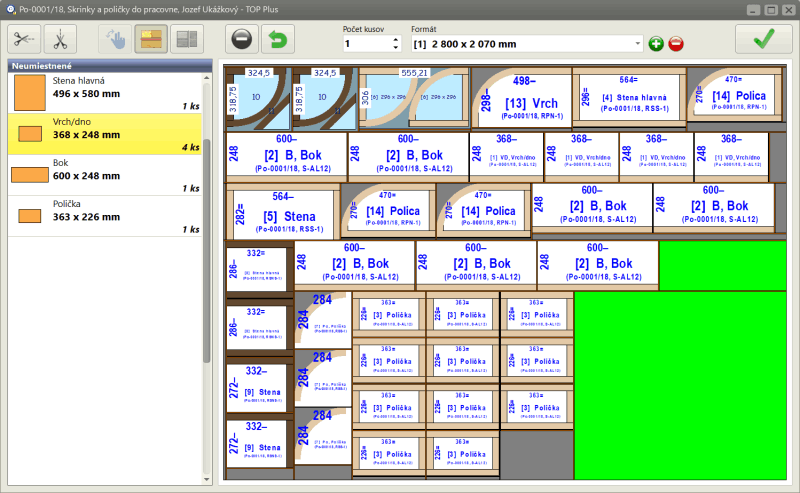
Cutting Plan Editor

Fine-Tune Your Layouts with Manual Adjustments

Key Features :

  • Interactive Layout Editing
    Easily remove parts from the calculated plan and reposition them in other areas. The editor highlights suitable placement zones with color cues, helping you find the best fit quickly and intuitively.
  • Custom Cut Direction Selection
    Choose the cutting direction for each part to match your machine setup or workflow preferences. This flexibility ensures smoother operations and better alignment with your production strategy.
  • Visual Part Management
    Removed parts are clearly listed in a side table, making it easy to track changes and reassign components. This helps prevent errors and ensures nothing gets lost in the shuffle.

Practical Benefits :

  • Tailor cutting plans to specific material constraints or machine limitations
  • Improve material usage by manually optimizing layouts beyond automatic calculations
  • Ideal for workshops with non-standard panel sizes or custom cutting requirements
  • Supports last-minute changes without needing to recalculate the entire project

Designed for Precision-Minded Makers

Whether you're a furniture manufacturer, cabinet maker, or custom fabricator, the Cutting Plan Editor helps you adapt layouts to real-world conditions. It’s especially useful when working with irregular materials, leftover stock, or complex part arrangements.

RK Software logo
Author of the program

© Rastislav Korytár, 1999-2026

www.optimik.com

Last updated:

22 September 2026